On-Device vs Cloud Receipt OCR
On this page5 sections
Every time a receipt scanner uploads a grocery bill, pharmacy slip, or supplier invoice to an external server, it exposes vendor locations, payment last-four digits, and tax identifiers. Running recognition inside the browser reverses that tradeoff by bringing compact neural models directly onto your own hardware.
Key takeaways
- Zero upload boundary: Browser headers enforcing Cross-Origin Isolation let ONNX Runtime compile multi-threaded WebAssembly directly in your tab with zero server ingestion.
- Predictable cost model: Processing up to 20 receipts or PDFs per batch runs on your device CPU without API credit limits or recurring subscriptions.
- Honest accuracy boundaries: Clear printed thermal slips and digital PDFs parse cleanly locally, while messy cursive handwriting still requires careful manual review.
How on-device WebAssembly OCR works inside your tab
Local receipt scanning replaces remote API calls with a static bundle served once and cached by your Service Worker. When you tap Choose photos or PDF, your browser resizes images toward an 1800 px working edge on a canvas before passing greyscale pixels into compact PP-OCRv6 detection and recognition graphs.
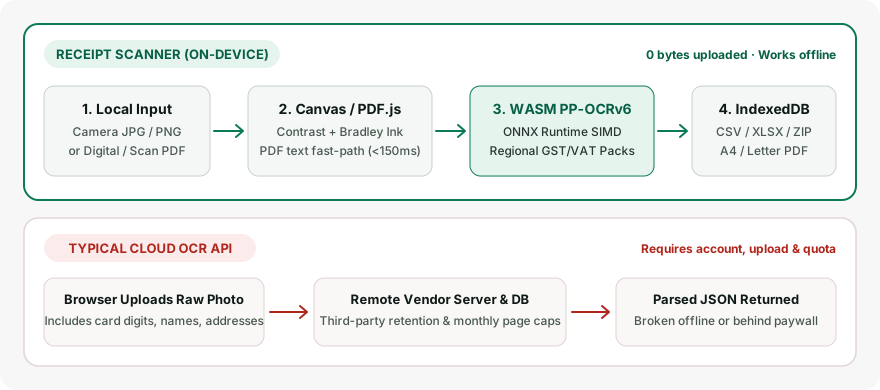
To achieve desktop-grade multithreaded speed without spawning external compute instances, pages ship strict browser isolation policies documented in MDN COEP header specifications alongside WebAssembly SIMD kernels powered by ONNX Runtime Web.
You can watch the exact byte boundary yourself inside DevTools or airplane mode by following our zero-upload privacy verification steps. Once the initial runtime weights finish caching, scanning continues even across mid-flight laptops with Wi-Fi disabled.
How COOP and COEP headers unlock SharedArrayBuffer multithreaded WASM
Running neural text detection locally without freezing mobile interfaces requires browser-level multithreading. Receipt Scanner serves Cross-Origin-Opener-Policy: same-origin alongside Cross-Origin-Embedder-Policy: require-corp so your browser places the tab in Cross-Origin Isolation and exposes SharedArrayBuffer.
When crossOriginIsolated is active, ONNX Runtime Web spawns up to 4 parallel WebAssembly SIMD threads (Math.min(4, hardwareConcurrency)), yielding roughly 2x faster CPU inference than single-threaded fallback. Static /paddle/ model weights and WASM files carry immutable one-year cache headers in our Service Worker (~15 MB compressed download once), eliminating recurring 5–15 second cellular image uploads on every subsequent receipt.
Verifying zero uploads in browser DevTools and Airplane Mode
Unlike server-backed apps whose privacy claims rest solely on policy text, on-device execution can be audited directly in thirty seconds:
- Open Scan on desktop and press
F12to open DevTools -> Network with Preserve log checked. - Scan one sample receipt so the Service Worker finishes caching the static
~15 MBWASM runtime andPP-OCRv6weights locally. - Switch the Network throttling menu to Offline (or toggle system Airplane Mode on your phone or laptop).
- Pick a fresh photo or digital PDF invoice, verify fields on Review, and observe zero outbound
POSTimage requests leaving your tab.
| Architecture Layer | Browser On-Device Isolated WASM | Cloud Server OCR API |
|---|---|---|
| Isolation & threading | COOP: same-origin + COEP: require-corp enables SharedArrayBuffer (<= 4 SIMD threads, ~2x CPU speed) |
Remote GPU cluster; total latency bound by uplink bandwidth and queue wait |
| Bandwidth pattern | ~15 MB static engine cached once by Service Worker; 0 B network per later receipt |
Uploads 1–5 MB full-resolution image bytes on every receipt submission |
| Flight & hotel Wi-Fi | Runs offline inside browser tab with zero upload stalls mid-flight | Fails in Airplane Mode; stalls 5–15 s per scan on weak mobile links |
| Network auditability | Provable in DevTools Network tab (0 POST uploads) + offline test |
Server retention, backups, and model-training policies remain unverifiable |
| Sensitive receipt exposure | NDA itineraries, medical bills, and legal retainers stay strictly inside local RAM | External transmission expands breach surface and vendor storage custody |
When should you choose on-device OCR over cloud scanners?
Choose local browser OCR whenever privacy, unlimited free volume, offline readiness, or instant disposable utility matters more than hands-free cloud storage. Choose server-hosted enterprise software only if your team demands automated cross-device sharing, multi-approver cloud workflows, or heavy handwritten-tip transcription without manual review.
Both architectures solve real accounting pain differently rather than one being universally superior. Understanding exact structural tradeoffs helps prevent workflow surprises right before tax season.
| Architecture Dimension | Browser On-Device OCR | Cloud Server OCR Platforms |
|---|---|---|
| Document network path | Stays inside browser tab memory | Uploaded to third-party servers |
| Monthly free scan cap | Unlimited local batches (20 files max/batch) | Commonly 5 to 25 receipts per month |
| Airplane mode support | Full scanning once assets cache | Fails offline without upload connection |
| Handwritten restaurant tips | Requires manual review and editing | Stronger server vision models |
| Multi-device ledger state | Single browser; manual export or ZIP backup | Automatic account-hosted remote database |
| Login & password requirement | Zero accounts required | Mandatory email and password sign-up |
Measuring accuracy tradeoffs on thermal paper and digital PDFs
Clean machine-printed retail slips and software invoices give compact WASM models very strong character clarity when framed flat and evenly lit. Where lightweight browser models stumble is curled thermal rolls shot at sharp angles, crossed-out tip adjustments, or multi-column hotel folios.
Receipt Scanner separates extraction into confidence badges—confident, probable, and check this—instead of hiding uncertainty behind blind automation. Always use the Rotate 90°, Crop, or Boost faded ink buttons in Review rather than accepting garbled digits, or jump straight into the browser receipt scanner with a sample bill to inspect how fields highlight on real documents.
For native electronic bills from airlines, cloud hosts, or utilities, the digital PDF fast-path extracts embedded vector text coordinates directly without pixel rasterization. Image preprocessing only engages when an uploaded PDF contains flat scanned photographs.
Comparing security, vendor lock-in, and tax verification duty
Cloud apps simplify cross-phone sharing by keeping your financial archive inside proprietary databases gated behind paid monthly plans. Exporting bulk attachments later can become awkward if an account lapses or pricing shifts upward for small contractors.
Keeping structured rows in browser IndexedDB eliminates third-party retention risk completely and pairs cleanly with no-credential ledger patterns detailed in our walkthrough on tracking expenses without bank logins. Regardless of whether a machine runs locally or remotely, OCR can misread zero for letter O, transpose dates, or double-count tax labels.
You must confirm every extracted merchant, invoice date, subtotal, tax amount, and grand total directly against the original paper slip or PDF before filing tax returns or reimbursement claims.
Practical decision checklist for solo workers and teams
Solo consultants, privacy-conscious households, fieldwork engineers, and travelers rarely benefit from paying SaaS monthly retainers just to turn twenty monthly slips into structured spreadsheets. Running batch extraction locally yields identical CSV columns and A4/Letter PDF expense packets without exposing client names.
Evaluate your own workflow against three quick criteria before committing a year of business records to any tool:
- Sensitive documents: Medical receipts, legal invoices, and supplier bills stay safest when processed offline inside your own hardware.
- Volume versus team size: One owner tracking one book needs local speed and clean CSV exports, as outlined in free freelancer scanner alternatives.
- Backup ownership: Schedule monthly ZIP photo backups so local browser storage never turns into a single point of failure.
Why NDA travel, medical, and legal receipts benefit most from local inference
Receipts carry far more identifying metadata than simple dollar totals. Keeping image pixels inside browser memory stops sensitive project, health, and legal identifiers from touching third-party server caches or human transcription queues.
- Client NDA travel itineraries: Airline boarding receipts, hotel folios, and dinner slips reveal undisclosed project cities, partner entities, and deal timing.
- Medical and pharmacy bills: Itemized clinic statements print diagnostic codes, prescription titles, and patient account references best kept offline.
- Legal and retainer invoices: Law-firm or compliance bills often list case numbers, opposing counsel names, and matter summaries covered under privilege.