Reconcile Receipts & Statements in Excel
On this page6 sections
- Mapping Receipt Scanner’s CSV schema against bank statement columns
- Why do exact Excel VLOOKUP matches miss valid scanned receipts?
- Five real-world statement discrepancies and how to resolve them
- Matching cleanly in Excel or Google Sheets step by step
- Closing missing receipt gaps and verifying totals safely
- Tracking non-banked expenses without Plaid or cloud feeds
Bank statements prove money left an account, whereas itemized receipts prove what was purchased and how much sales tax or GST applies. Matching monthly card CSV downloads against your Receipt Scanner ledger catches missing tax invoices, unlogged cash tips, and duplicate charges before month-end books close.
Key takeaways
- Allow posting lag: Real credit card batches clear 1–3 days after register printouts, breaking strict same-day
XLOOKUPformulas unless you build a small date window.- Clean CSV contract first: Our 19-column RFC 4180 export ships standard ISO
YYYY-MM-DDdates and exact minor-unit numbers without broken currency symbols inside numeric cells.- Choose formulas or zero-code tools: Match directly in Excel/Sheets using normalized amount keys, or run one-to-one browser matching locally with zero bank logins.
Mapping Receipt Scanner’s CSV schema against bank statement columns
Card issuer CSV portals rarely mirror point-of-sale slip wording—a cozy café called The Roasted Bean on paper frequently lands on Visa statements as SQ *ROASTED BEAN SFO CA. Because text strings drift wildly across payment processors, reliable matching hinges primarily on numeric amount equality paired with short date windows rather than exact merchant names.
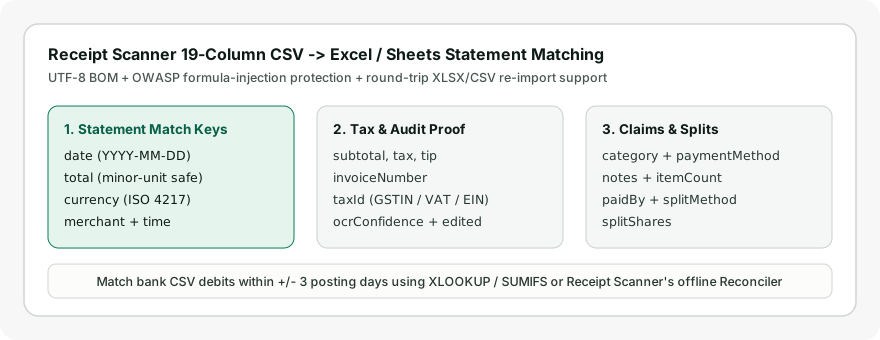
Every CSV generated inside Receipt Scanner includes a UTF-8 BOM compliant with IETF RFC 4180 CSV specifications alongside protective quote prefixing aligned with OWASP CSV Injection safeguards, ensuring Excel reads numeric totals immediately without corrupting European umlauts or triggering malicious formulas from untrusted vendor strings.
| Matching Field | Bank Statement Export Quirks | Receipt Scanner CSV Column |
|---|---|---|
| Transaction Date | Clearing date often +1 to +3 days later than swipe | date (YYYY-MM-DD ISO checkout date) |
| Amount / Charge | Separate Debit/Credit cols or negative outflows (-42.50) |
total + separate currency column |
| Tip & FX Drift | Restaurant settlement adds post-swipe gratuity | Separate subtotal, tax, and tip columns |
| Merchant String | Abbreviated clearing prefix (POS *, SQ *, city code) |
merchant + editable notes |
Why do exact Excel VLOOKUP matches miss valid scanned receipts?
Two operational details trip up naive spreadsheet formulas every month: authorization-to-settlement clearing lag over weekends and unsigned vs signed number conventions. A hotel checkout dated Friday evening frequently settles on Monday morning three calendar days later, causing exact-date VLOOKUP or XLOOKUP keys to return false missing errors.
Using our client-side Statement Reconciliation Matcher handles signed negative amounts, separate Debit/Credit columns, MM/DD/YYYY vs DD/MM/YYYY formatting, and greedy 1-to-1 date-window pairing automatically without nested array formulas.
Spreadsheet XLOOKUP date-window formulas vs instant browser matching
To match inside Excel 365 without external tools, name your Receipts columns ReceiptTotals, ReceiptDates, and ReceiptMerchants. Assuming statement dates sit in A2 and amounts in C2, use =XLOOKUP(1, (ReceiptTotals=ABS(C2))*(ReceiptDates>=A2-3)*(ReceiptDates<=A2+1), ReceiptMerchants, "Missing") to match across a clearing window.
In Google Sheets or older Excel builds, run =COUNTIFS(ReceiptTotals, ABS(C2), ReceiptDates, ">="&(A2-3), ReceiptDates, "<="&(A2+1)) to flag zero-hit or duplicate matches. Browser-side matching avoids formula setup, spots ±2% FX drift or ±15% tip gaps as Possible Match, and exports a 10-column reconciliation CSV.
Five real-world statement discrepancies and how to resolve them
Even when every paper receipt is scanned cleanly, roughly ten percent of monthly card statement lines diverge slightly from checkout slips. Identifying which of five standard clearing behaviors caused a mismatch resolves false missing-receipt alerts in minutes.
| Mismatch Cause | What Appears on Bank Statement | Why Receipt Differs | Resolution Rule |
|---|---|---|---|
Settlement lag (+1 to +3 days) |
Monday or Tuesday posting date | Merchant settles batches after weekend or cutoff | Match within [ReceiptDate, ReceiptDate + 3] window |
| Pre-tip vs post-tip dining charge | Higher final settled card total | Paper customer copy showed pre-tip food subtotal | Update tip on receipt or set ±15%–25% tip tolerance |
| Gateway descriptor prefixes | SQ *ROASTED, TST* BISTRO, PAYPAL *VENDOR |
Processor prepends gateway code to merchant text | Match on amount and date first, then check notes |
| Foreign card FX spread | Home-currency charge 1%–3% above spot rate |
Card network conversion or dynamic currency markup | Record settled figure in homeAmount or use ±2%–3% tolerance |
| Split e-commerce shipments | Two smaller debits days apart (89.00, 59.00) |
One 148.00 order invoice billed per shipped box |
Annotate partial totals in notes and check group sum |
Handling restaurant tip settlements and payment-gateway prefixes
Full-service restaurants authorize your card for the pre-tip check before adding handwritten gratuity at nightly batch close. Unless you write the final tipped total onto the Review screen (tip plus total), strict dollar matching fails; use a ±15% to 25% tolerance window to surface dining slips under Possible Match.
Similarly, point-of-sale processors like Square (SQ *), Toast (TST*), and PayPal (PAYPAL *) truncate or alter store names in bank statements. Prioritize numeric amount and date-window matching first, then inspect token overlap or save the clean vendor alias inside notes for audit trails.
Resolving foreign FX spreads and split e-commerce shipments
Cross-border card purchases settle at your issuer’s clearing exchange rate plus foreign transaction fees, creating a 1% to 3% spread against the printed EUR or JPY slip. Enter your statement’s settled home-currency figure in homeAmount during review, or inspect Possible Match rows with ±2% to 3% tolerance.
Online retailers frequently charge one $148.00 order invoice across two separate warehouse shipment debits ($89.00 on Tuesday, $59.00 on Thursday). Verify that the partial statement debits sum precisely to the parent PDF invoice total, and document the invoice reference in each debit’s review note.
Matching cleanly in Excel or Google Sheets step by step
When controllers prefer working directly inside a single workbook alongside corporate general ledgers, export your Receipt Scanner rows and keep everything formula-driven across three tidy tabs:
- Grab one blank workbook structure from free Excel and CSV templates or paste your exported Receipt Scanner sheet into tab
Receipts. - Paste monthly downloaded checking or credit card CSV charges into tab
Bank_CSV, converting any negative charge signs cleanly to positive magnitudes via=ABS(...). - Add a helper lookup column in
Bank_CSVusingCOUNTIFSorXLOOKUPcheckingReceiptsrows whosetotalequals the statement charge AND whosedatesits between[PostDate - 3, PostDate + 1]. - Filter unmatched zero-hit bank rows to uncover missing supplier PDFs or cash-out discrepancies quickly.
Document every resolved exception directly in a separate review column (Verified, Lost Slip, or Personal Spend) so external reviewers can trace adjustments months later cleanly without guessing why rows differed slightly.
Closing missing receipt gaps and verifying totals safely
Any unmatched bank debit usually traces back to either an un-scanned emailed SaaS PDF in your inbox, a faded gas slip, or a small cash shuttle ride without a paper ticket. Sorting missing rows immediately by dollar value highlights the highest-impact gaps first so small unrecoverable stubs do not delay monthly close.
Monthly close sign-off steps
Before locking monthly books or exporting final reimbursement schedules, run through a five-step close sequence so every card charge ties out cleanly:
- Scan any newly uncovered emailed SaaS invoices or missing paper slips into the active Book, or generate signed missing-receipt declarations for unrecoverable tolls and parking meters.
- Clear every
Possible Matchdining tip or FX rounding row by confirming final settled card totals against original receipts. - Verify that same-day duplicate amounts (such as two identical
$12.00coffee charges) paired one-to-one with distinct receipts rather than cross-matching. - Export and archive the 10-column reconciliation CSV alongside your 19-column expense CSV and a full JSON or ZIP device backup.
Once missing paper charges are located and verified inside your spreadsheets, bring cleaned historical CSV edits cleanly back into your active Books following steps in importing CSV and Excel workbooks. Pairing browser capture with periodic spreadsheet validation ensures annual accounting exports reconcile dollar for dollar without last-minute surprises.
Tracking non-banked expenses without Plaid or cloud feeds
Keeping bank passwords off budgeting apps stays practical precisely because monthly CSV reconciliation takes only five minutes at statement close. Rather than trusting automated third-party connections to guess ambiguous merchant categories blindly, you pair read-only statement exports directly with original receipt tax breakdowns.
Explore practical no-credential workflows inside tracking expenses without bank logins. Remember that heuristic amount matching can pair two same-day identical charges incorrectly if totals happen to tie, so always verify matched merchant descriptions, dates, and tax amounts directly against original bank statements and original source receipts before closing company books or filing taxes.